AI Infrastructure
Data field hallucination is the silent bug no safety net catches — here's the engineering fix.
Picture this. Your AI coding assistant just generated a complete analytics dashboard — filters, charts, KPI cards, a sortable data table. The code compiles. TypeScript reports zero errors. The linter is clean. You even wrote a unit test, and it passed.
You deploy it. The dashboard loads. Every card shows a dash. Every chart is empty. Every table row is blank.
The AI referenced monthly_growth_rate, customer_ltv, and conversion_funnel_rate. Your dataset has growth_rate_mom, ltv_usd, and cvr_click. Close enough to look right. Different enough to return nothing.
This isn't hypothetical. It's the failure mode we hit repeatedly — and the one that none of our existing safety nets were designed to catch.

Ⅰ. The Safety Nets All Miss It
This is not a code quality problem. The code is fine. This is a data fidelity problem — and it's uniquely dangerous because every safety net you rely on misses it.
Type systems can't catch it. The field name is a string. monthly_growth_rate is a perfectly valid string. TypeScript doesn't know — and can't know — whether that string corresponds to an actual column in your data warehouse.
Tests can't catch it. Your unit test mocked the API response with the same hallucinated field names. The mock matched the code. The code matched the mock. Both were wrong.
Code review can't catch it. A human reviewer sees monthly_growth_rate and thinks, "Yeah, that's probably what it's called." The name is plausible. It follows naming conventions. It just doesn't exist.
It fails silently. A missing field doesn't throw an error. It returns null. Your chart renders — . It just renders nothing. In a production environment, this can go unnoticed for days.
The industry conversation around AI coding hallucinations has focused on logic errors — wrong algorithms, broken control flow, security vulnerabilities. Those are real, but they're visible. They crash. They throw exceptions. They produce obviously wrong output.
Data field hallucination is invisible. It looks correct. And, in a decision-support context — where dashboards inform budget allocation, performance evaluation, and strategic pivots — invisible errors are the most expensive kind.
A hallucinated field name doesn't crash your app. It just makes every decision wrong.
Ⅱ. The Engineering Framework
At Lanbow, we ran into this problem building analytics infrastructure across different client verticals — dozens of metrics each, new dashboard views every sprint. AI coding tools made the UI work trivial. But field alignment became the bottleneck that broke everything.
Here's the engineering framework we built to solve it.
1. Hard Contracts vs. Soft Contracts
Not all fields in a dataset are created equal. We classify them into two categories:
Hard contracts are identifiers that the system uses to fetch data. Get one wrong, and the query returns nothing — or worse, wrong data:
Dataset identifiers — the UUID or table reference that tells the query engine where to look
Column names — the exact string used in
GROUP BY,WHERE, andSELECTclausesMetric names — the exact string that maps to a pre-defined aggregation expression
Soft contracts are metadata used for display. Get one wrong, and the label is awkward — but the data is still correct:
Display names — the human-readable label shown in the UI ("Cost Per Click" vs.
cpc)Format strings — whether a number renders as
$1,234or1234.00Descriptions — tooltip text explaining what a metric means
This distinction sounds obvious, but most teams never make it explicit. Their dashboards mix hard and soft references freely. Their AI tools definitely don't know the difference.
The engineering rule: hard contracts are compile-time constants, never generated. They come from the dataset schema and are referenced by exact match. Soft contracts are fetched at runtime from a metadata API and can change without redeploying code.
2. Schema as the Single Source of Truth
If field names are contracts, the dataset schema is the contract document.
We maintain dataset definitions in version-controlled YAML files — not in a UI, not in a wiki, not in someone's head. Each file declares every column and every metric with its exact identifier, data type, aggregation expression, and display metadata.
Here's a simplified example:
When an AI tool generates dashboard code, it doesn't invent field names. It reads them from the schema. Every metric_name in the generated code must trace back to a declared identifier in the schema file. If it's not in the schema, it doesn't exist — no matter how plausible it sounds.
This also means changing a field name is a versioned, reviewable event. A pull request. A diff. A CI check. Not a silent edit in a BI tool's admin panel that breaks three dashboards downstream.
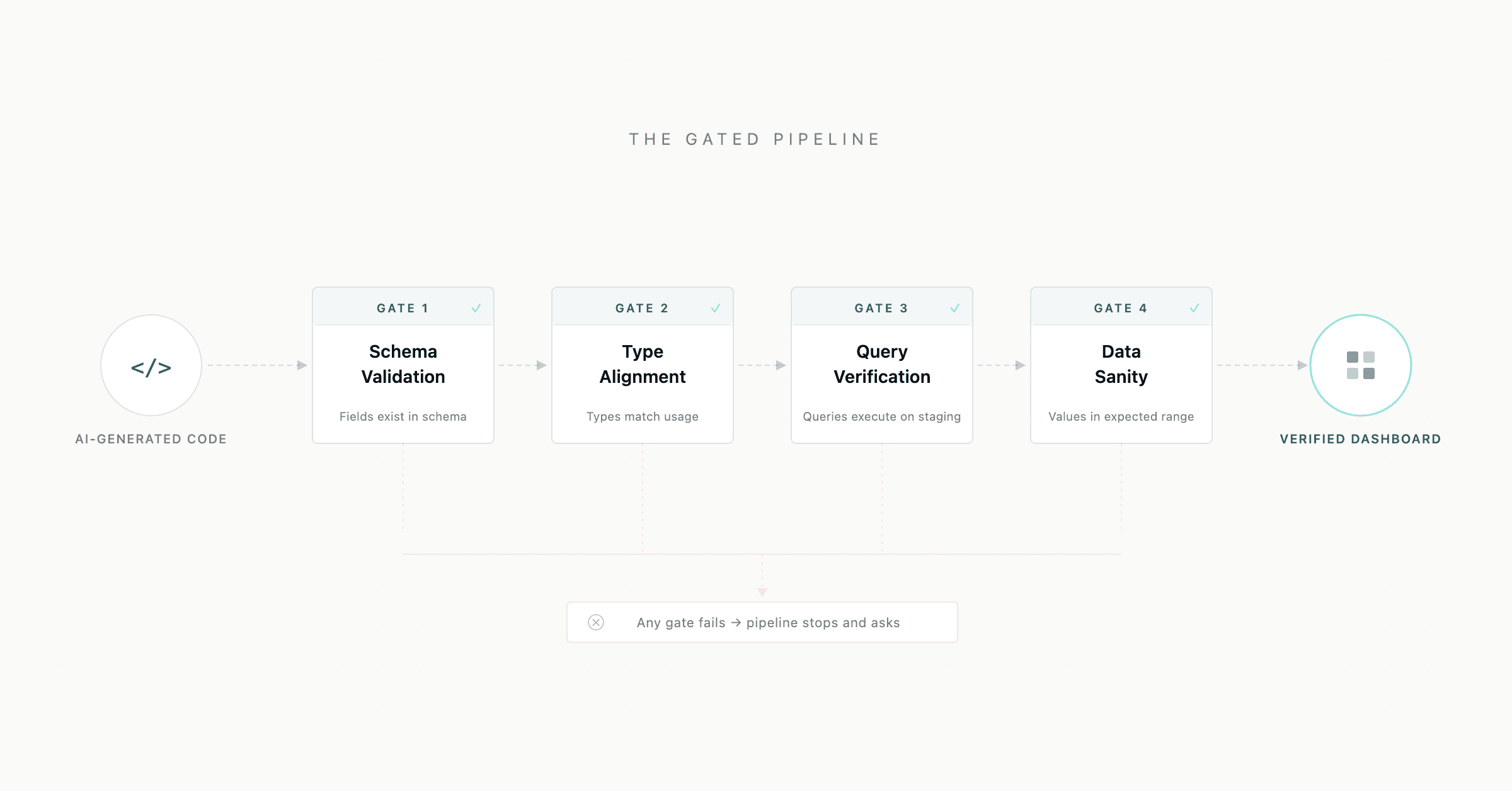
3. The Gated Pipeline
Schema-as-contract only works if there's a process that enforces it. We built a four-gate pipeline that blocks progression until each gate passes:
Gate | Check | Blocks on |
|---|---|---|
Gate 1: Schema Validation | Every field referenced in code exists in the YAML schema | Unknown field names |
Gate 2: Type Alignment | Field types match their usage (e.g., currency field isn't used as a percentage) | Type mismatches |
Gate 3: Query Verification | Generated queries execute successfully against a staging dataset | Runtime query failures |
Gate 4: Data Sanity | Returned values fall within expected ranges (non-null, non-negative where applicable) | Silent data issues |
No gate can be skipped. No field can be "probably this one." If a field can't be mapped or verified, the pipeline stops and asks.
4. AI Capability Boundaries
The final piece defines what AI is allowed to decide and what it must look up.
AI Decides (Creative) | AI Looks Up (Contractual) |
|---|---|
Layout and component composition | Dataset identifiers |
Chart type selection | Column and metric names |
Filter interaction design | Aggregation expressions |
Color schemes and visual hierarchy | Field data types |
Responsive breakpoints | Available dimensions and measures |
State management patterns | Query syntax and API endpoints |
This isn't about limiting AI capability. It's about directing it. An AI coding tool is excellent at layout, component composition, state management, and interaction design. It's terrible at knowing what funnel_stage_3 is called in your specific data warehouse.
Let AI do what it's good at. Make it look up what it can't know.
Ⅲ. What Changes
When this pipeline is in place, the workflow changes fundamentally.
A data analyst describes what they want to see: "I need a dashboard showing cost efficiency metrics across accounts, with a funnel breakdown by conversion stage."
The system checks the schema. Cost efficiency metrics — cpm, cpc, cpa — exist. Funnel stages — install, registration, first_deposit — exist. Account dimensions — account_id, account_name — exist. Every field is verified before a single line of dashboard code is generated.
The AI generates the UI. It makes layout decisions, picks chart types, designs filter interactions. These are creative decisions it's good at. But every data reference in the generated code points to a verified field. There's no monthly_growth_rate that doesn't exist. There's no customer_ltv that's actually called something else.
The result: a data team can ship a new dashboard and be confident the data is right — not because they manually verified every field reference, but because the pipeline structurally prevents referencing a field that doesn't exist.
This is what we mean when we say decision systems can be engineered. Not just the final product that end users see — but the internal tooling that produces it.
Ⅳ. Start Here
If your team is building data applications with AI assistance, run this checklist:
✅ Can your AI tool enumerate your real field names — or does it guess?
✅ Are field references in your dashboard code schema-derived or hand-typed?
✅ Is there a gate between "code compiles" and "data verified"?
✅ Do you distinguish between fields that fetch data and fields that display labels?
If any answer is "no" or "I'm not sure," you have a structural problem that no amount of prompt engineering will fix. The fix is architectural: make your dataset schema the single source of truth, enforce it through a gated pipeline, and draw a clear line between what AI decides and what it looks up.
Data fidelity is an engineering problem. But the cost of getting it wrong is a business problem — every dashboard that shows wrong numbers leads to wrong decisions. That's why we treat the pipeline as decision infrastructure, not just developer tooling.
Lanbow builds enterprise growth decision systems — infrastructure that connects market signals, decision logic, and execution into auditable decision loops. Book a 30-min strategy diagnostic →